We’re told every once in a while by Anthropic that almost all code will be written by AI in the next 6 months. Honestly, how Dario Amodei has any credibility left is beyond me. When it comes to AI tooling, I would rather listen to people who actually are known for software engineering and are legends of our industry. People like Uncle Bob, Kent Beck, James Gosling, DHH, Kailash Nadh etc. The take that makes the most sense to me is -
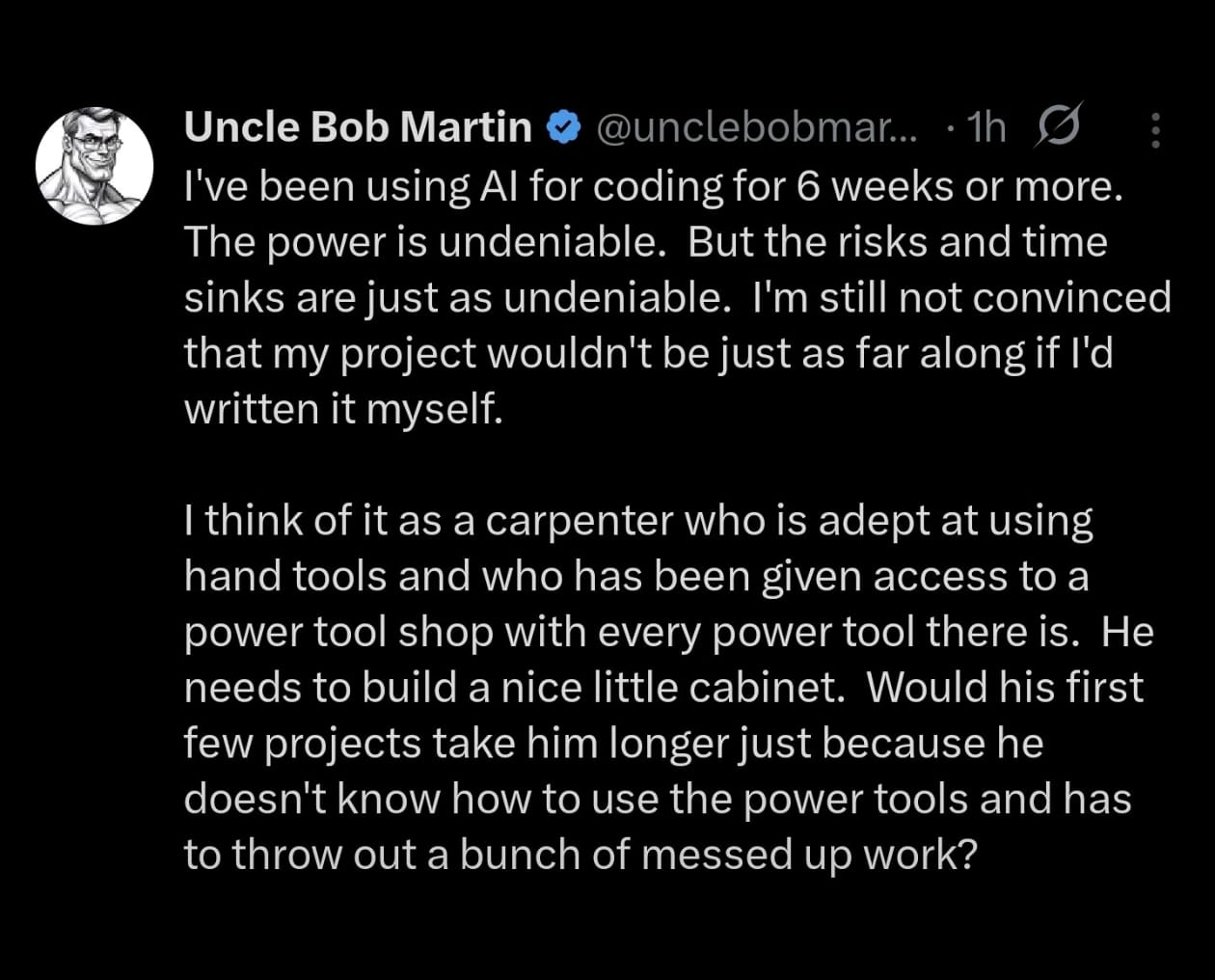
That said, familiarizing myself with the new brand of power tools seems obvious. Now in 2026, the models seem to have gotten to a level where they don’t generate garbage all the time. It’s like any other technology: either you move with time or you get left behind. From my initial research getting up to speed on AI coding tools boils down to 3 things.
Step 1
Figuring out which model fits well for different tasks based on modality. The general wisdom on the Internet seems to be using a bunch of models in tandem depending on the task. For general purpose coding a cheaper model can be used whereas a more expensive reasoning model can be used for planning tasks and code review.
There are 3 ways to consume LLMs for coding agents:
- Use vendor provided coding plan that comes at a fixed monthly subscription of ~ 20 dollars per month. Personally I am not a fan of monthly recurring subscriptions and the its quite well known now that these plans either remain underutilized or people use up way more tokens than the subscription cost. So basically the vendor is eating up the extra cost which is being subsidized by Venture capitalists. When that money dries up the cost of these plans are expected to rise substantially
- Use API rates with a prepaid top-up. This is the way I am going because it’s closer to the real-world cost of using LLMs. The reality is at the current API rates the mainstream vendors are not affordable. A great alternative is Chinese labs such as Moonshot AI and DeepSeek that are on average 3-5 times cheaper with comparable model performance.
- Use model aggregators that offer multiple models via a single billing account and API interface that can operate on multiple LLMs e.g. OpenRouter or OpenCode Zen. I personally don’t want to add one more layer to the setup and so am avoiding these for the time being but conceptually these are a great idea. They smooth over the issues caused by differences between various vendor APIs.
What I am picking -
Kimi K2.5 - It’s basically Claude Sonnet for cheapskates like me. This could be my main workhorse as it’s the model that’s actually affordable at API rates
GPT 5.3 Codex / Claude Opus 4.6 - Leading edge model by OpenAI / Anthropic for coding tasks. These are quite expensive at API rates so I am going to use this for more complex coding tasks and plan mode.
Step 2
Selecting the harness that works best for you i.e. the tooling that wraps the LLM in a loop and interacts with your IDE, OS, Filesystem, Git etc. The harness software consists of key components such as the API integration with the LLM provider, Agent ReAct loop, and tool implementations. Optionally it can also have support for different modes (plan / build), custom plugins, MCP server connectivity etc. Broadly there are two UX options here -
- The Side Panel chat integrated into your IDE. I don’t really find the side panel approach intuitive. The chat could be setup as a plugin for existing IDEs like VS Code or IntelliJ IDEA. Or there are AI native IDEs like Cursor, Antigravity and Kiro.
- The terminal-based standalone tools. The entire agent runs in the terminal and executes its tool calls directly via terminal commands. Examples are Claude Code from Anthropic, Codex CLI from OpenAI, Gemini CLI from Google, OpenCode etc.
Something just clicked for me with this approach, but the choice can vary from person to person depending on their preferences.
OpenCode emerged as the obvious choice for my personal usage primarily because it’s open source and compatible with almost all LLM providers, therefore preventing vendor lock-in. It also comes with Plan/Build mode loop which I plan to use to delegate tasks between different models, support for custom skills, and MCP servers.
Step 3
Managing context efficiently via steering docs becomes essential for large code-bases so some thought has to be given to AGENTS.md. An interesting idea I came across is using Mermaid diagrams to encode complex app knowledge into your agent docs. Multiple markdown files organized by functional modules can be linked in the AGENTS.md file to allow for progressive disclosure of information to the agent and not overwhelm the agent’s context window.
Another use case could be using Agent Skills. These are collections of reusable prompts in Markdown format that assist the agent in domain-specific tasks. Optionally, they may include bash/python scripts that the agent can execute to complete the task at hand. The agent is only made aware of the skill names and descriptions initially. If the agent decides a skill is relevant then only its actual content is loaded from disk into the agent’s context window. This is quite unlike MCP which loads all tools at the beginning itself filling up the context window unnecessarily.
Vercel hosts an open directory of skills developed in open source - https://skills.sh/